部分网站例如像nodejs.cn这种会强制弹广告
若你安装了类似adblock 或者adguard这种反广告插件
这种网站就会强制弹出“检测到您的浏览器插件正在注入异常脚本,请使用隐身模式打开页面!”
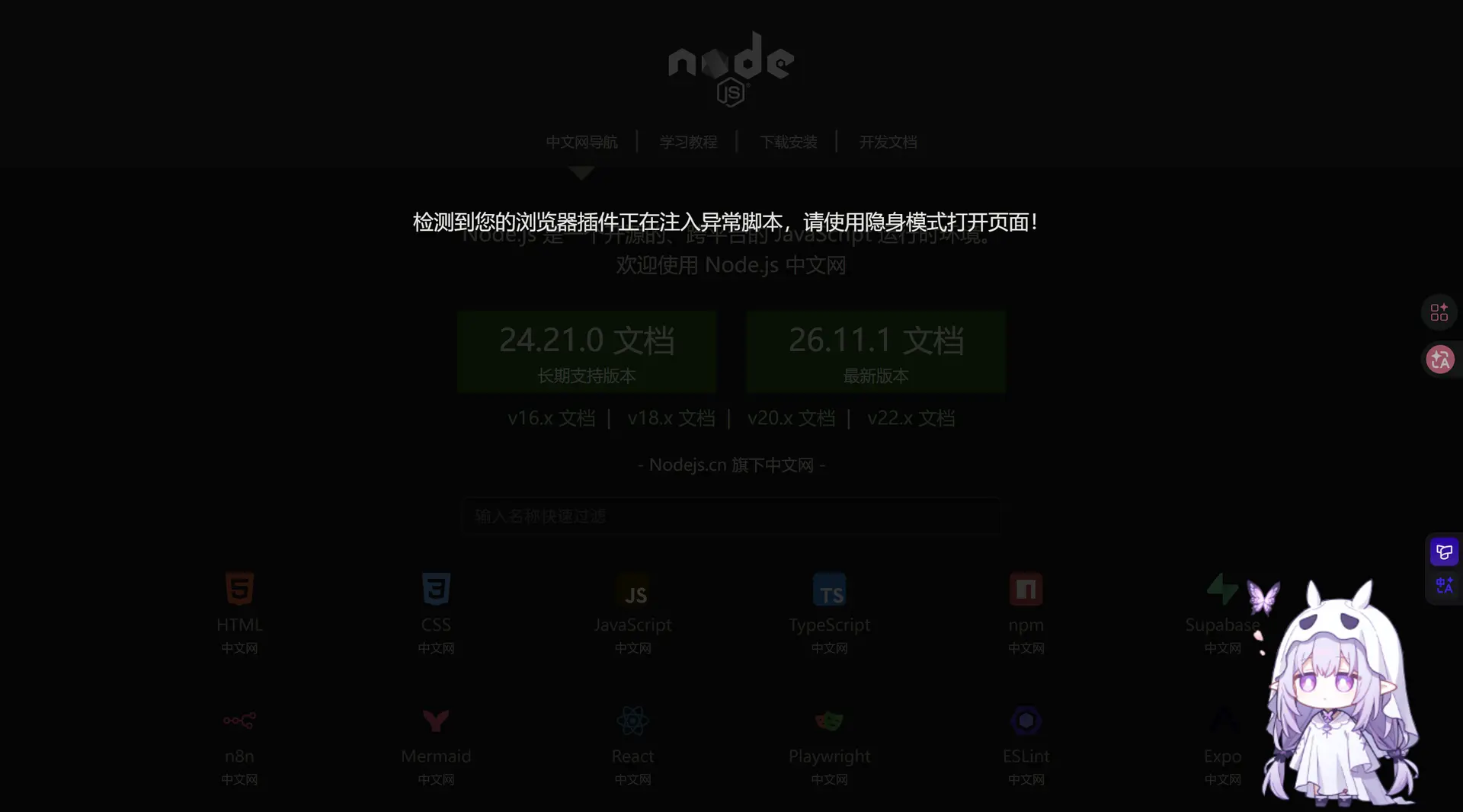
使用如下篡改猴脚本可以消除这句话强制进入网站界面,然后就可以用反广告插件来避免他们的广告
你也可以点击前往greasyfork下载我的这个插件,同样的也推荐这个作者的反广告插件
也可以自己用如下代码制作一个
javascript
123456789101112131415161718192021222324252627282930313233343536373839404142434445464748495051525354555657585960616263646566676869707172737475767778798081828384858687888990919293949596979899100101102103104105106107108109110111112113114115116117118119120121122123124125126127128129130131132133134135136137138139140141142143144145146147148149150151152153154155156157158159160161162163164165166167168169170171172173174175176177
// ==UserScript==
// @name         Nodejs.cn 旗下中文站点净化
// @namespace    https://nodejs.cn/
// @version      1.0.0
// @description  清理 Nodejs.cn 及其旗下子站的广告和插件检测警告
// @author       kfcViVo50$
// @icon         https://nodejs.cn/favicon.svg
// @match        https://nodejs.cn/*
// @match        https://*.nodejs.cn/*
// @run-at       document-start
// @grant        none
// @license      MIT
// @downloadURL https://update.greasyfork.org/scripts/601131/Nodejscn%20%E6%97%97%E4%B8%8B%E4%B8%AD%E6%96%87%E7%AB%99%E7%82%B9%E5%87%80%E5%8C%96.user.js
// @updateURL https://update.greasyfork.org/scripts/601131/Nodejscn%20%E6%97%97%E4%B8%8B%E4%B8%AD%E6%96%87%E7%AB%99%E7%82%B9%E5%87%80%E5%8C%96.meta.js
// ==/UserScript==

(function () {
    'use strict';

    // ==================== 1. 广告选择器 ====================
    // 根据需要自行添加、删除或修改选择器。
    const AD_SELECTORS = [
        '#bottomad',
        '.mymn-full',
        '.mymn-full-space',
        '.adsbygoogle',
        '.fc-message-root',

        // 在这里添加你自己确认的广告选择器
    ];

    // ==================== 2. 检测警告配置 ====================
    const WARNING_TEXT =
        '检测到您的浏览器插件正在注入异常脚本';

    // ==================== 3. 隐藏匹配的广告 ====================
    function hideElement(element) {
        if (!(element instanceof HTMLElement)) {
            return;
        }

        element.style.setProperty(
            'display',
            'none',
            'important'
        );
    }

    function forEachMatch(root, selector, callback) {
        try {
            // 检查节点本身
            if (
                root instanceof Element &&
                root.matches(selector)
            ) {
                callback(root);
            }

            // 检查节点内部的后代元素
            if (typeof root.querySelectorAll === 'function') {
                root.querySelectorAll(selector).forEach(callback);
            }
        } catch (error) {
            console.warn(
                '[Nodejs.cn 净化] 无效的选择器:',
                selector,
                error
            );
        }
    }

    function cleanAds(root = document) {
        for (const selector of AD_SELECTORS) {
            forEachMatch(root, selector, hideElement);
        }
    }

    // ==================== 4. 清理插件检测警告 ====================
    function isWarningOverlay(element) {
        if (
            !(element instanceof HTMLElement) ||
            element.tagName !== 'DIV'
        ) {
            return false;
        }

        // 只处理符合特征的全屏固定定位警告层,
        // 不删除页面中其他普通的 div。
        if (
            element.style.position !== 'fixed' ||
            element.style.zIndex !== '999999'
        ) {
            return false;
        }

        const text = element.innerText || element.textContent || '';

        return text.includes(WARNING_TEXT);
    }

    function cleanWarningIn(root = document) {
        if (
            root instanceof Element &&
            isWarningOverlay(root)
        ) {
            root.remove();
            return;
        }

        if (typeof root.querySelectorAll !== 'function') {
            return;
        }

        root.querySelectorAll('div').forEach(element => {
            if (isWarningOverlay(element)) {
                element.remove();
            }
        });
    }

    // 处理新插入的节点,同时检查它的祖先节点。
    // 某些网站会先插入空容器,再向容器中添加警告文本。
    function cleanWarningNear(node) {
        let element =
            node instanceof Element ? node : node.parentElement;

        for (
            let current = element;
            current;
            current = current.parentElement
        ) {
            if (isWarningOverlay(current)) {
                current.remove();
                return;
            }
        }

        cleanWarningIn(node);
    }

    // ==================== 5. 监听动态插入的内容 ====================
    function start() {
        const root = document.documentElement;

        // document-start 时 HTML 根节点可能尚未创建。
        // DOMContentLoaded 事件会再次调用此函数。
        if (!root) {
            return;
        }

        // 首次清理已存在的元素
        cleanAds(document);
        cleanWarningIn(document);

        // 监听网站后续动态添加的广告和警告层
        const observer = new MutationObserver(mutations => {
            for (const mutation of mutations) {
                for (const node of mutation.addedNodes) {
                    cleanAds(node);
                    cleanWarningNear(node);
                }
            }
        });

        observer.observe(root, {
            childList: true,
            subtree: true
        });
    }

    // 尽早运行,并兼容根节点尚未生成的情况。
    document.addEventListener('DOMContentLoaded', start, {
        once: true
    });

    start();
})();
道高一尺魔高一丈属于是